Backup#
The cluster needs a backup solution that captures the contents of persistent volumes. Velero and Longhorn's built-in backup were both evaluated and ruled out: Longhorn does block-level backups, and Velero did not produce file-level snapshots in the way I wanted (admittedly I may have missed something).
The current setup uses restic, a single shared backup script, and a fleet of standalone CronJobs. Each target has its own CronJob, but all of them share one repository, one password, and one retention pass.
restic provides everything I want from a backup tool:
- ✅ ... encryption
- ✅ ... compression
- ✅ ... deduplication
- ✅ ... retention policies
The shared script (backup.sh) is small and config-driven via environment variables. It runs restic backup, optionally pushes Pushgateway metrics, and optionally sends a ntfy notification on failure.
Architecture#
The fleet writes local-first: every workload pushes to a Restic REST-server running on node04, backed by /vol_raidz1/restic-local. A daily mirror CronJob copies the local repository to Wasabi for off-site protection.
Why local-first#
- Backups run at gigabit LAN speed regardless of the upstream uplink.
- Wasabi's free-egress envelope (1:1 monthly egress to storage) becomes a non-issue — the mirror only writes, restores happen primarily against the local repo.
- A Wasabi outage no longer breaks ongoing backups, only off-site freshness.
- Restoring 100 GB locally is wire-speed, not internet-speed.
The shared script lives as ConfigMap crontab-backup-script in the longhorn namespace and is mirrored into every namespace by Reflector, so every backup CronJob mounts it from its own namespace.
The script source is in the git repository. Pods using the script need to be restarted after script changes (delete the pod or roll the deployment).
Backup fleet#
| Target | Namespace | Schedule | Tag | Hostname | Source |
|---|---|---|---|---|---|
| MariaDB | databases | :10 hourly (skip 02-03) | mariadb | mariadb | kubectl exec dump → /backup/mariadb.xb |
| Grafana | monitoring | :20 hourly | grafana | grafana | PVC longhorn-pvc-grafana |
| Emby | media | :30 hourly | emby | emby | PVC longhorn-pvc-emby |
| NextPVR | media | :40 hourly | nextpvr | nextpvr | PVC longhorn-pvc-nextpvr-config |
| Downloader (*arr-stack) | downloader | :50 hourly | downloader | downloader | hostPath, ZFS node |
| Paperless-ngx | paper | :00 hourly | paperless | paperless | 3 SMB PVCs (data, media, export) |
| td-sync | td-sync | 35 hourly | td-sync | td-sync | PVC longhorn-pvc-td-sync, sqlite3 .backup snapshot of server.db + per-project databases |
| Retention | longhorn | 03:05 daily | n/a | restic-retentionpolicies | (forget + prune + integrity check) |
| Restore-test | longhorn | 04:00 Sun | n/a | backup-restore-test | restore every tag from local repo, verify |
| Wasabi mirror | backup | 05:00 daily | n/a | backup-mirror-wasabi | rclone copy local → Wasabi |
Hourly slots are 10 minutes apart and the workload backups are capped at activeDeadlineSeconds: 540 (paperless gets 7200 for the cold-start upload), so they cannot overlap with each other or with the daily 03:05 / 04:00 / 05:00 maintenance passes.
The pod app.kubernetes.io/name label is always backup-<target> (e.g. backup-grafana) and pods carry app.kubernetes.io/component: backup so the Pushgateway NetworkPolicy can match by component.
CronJob skeleton#
Below is the Grafana CronJob, simplified. All non-mariadb backups follow the same pattern (PVC mounted at /backup/<target>, podAffinity to the app pod when the PVC is RWO):
The matching encrypted Secret holds RESTIC_REPOSITORY, RESTIC_PASSWORD, the Wasabi credentials, the ntfy and Pushgateway settings, and the per-target RESTIC_HOSTNAME / RESTIC_ADDITIONAL_BACKUP_PARAMETERS. See the restic configuration example below.
Restore#
All snapshots are encrypted and stored on the local rest-server at rest:http://rest-server.backup.svc.cluster.local:8000/. Listing and restoring both require the rest-server's HTTP basic-auth credentials and the restic repository password — both live in every per-target backup-secrets.enc.yaml.
The Wasabi mirror at s3:s3.eu-central-2.wasabisys.com/k3s-at-home-01/restic-backup is the fallback. Use it when the local repo is unavailable; the credentials are in apps/backup-script/restic-secrets.enc.yaml under the WASABI_* prefix.
Generic workflow#
The simplest way to get a shell with restic, the rest-server credentials, and the in-memory cache already wired up is to spawn a one-shot debug pod from the existing backup secret of the target you want to restore from:
Pick the namespace and Secret name that matches the target you want to restore. Replace --tag grafana accordingly. The repository URL the secret points at is the local rest-server (rest:http://...:8000/), so restores stream from node04 at LAN speed.
Restoring from the Wasabi off-site mirror#
If the local rest-server is unavailable (node04 down, ZFS pool offline, etc.), restore directly from the Wasabi mirror by overriding the repository URL inside the debug pod:
The Wasabi creds live encrypted in apps/backup-script/restic-secrets.enc.yaml under the WASABI_* prefix. The shared RESTIC_PASSWORD is the same for both repos (restic copy between them is a straight blob copy).
MariaDB#
The MariaDB backup is a mariabackup --stream=xbstream dump, restic-archived as /backup/mariadb.xb. Restore the stream, extract it, prepare the data directory, then either swap it into the live MariaDB or import the tables.
Emby / NextPVR#
Downloader (Sonarr / Radarr / Lidarr / NZBGet / NZBHydra2 / Trailarr)#
The downloader snapshot contains all six app config trees in a single tag. Pick the subfolder you need.
-wal and -shm files travel with the database file in the snapshot if they existed at backup time — make sure to restore them alongside the .db.
Paperless-ngx#
Three top-level paths come back: paperless-data (Postgres-style metadata, SQLite cache, etc.), paperless-media (the document archive itself), and paperless-export.
Grafana#
lost+found at the PVC root is excluded by the backup; everything else (plugin data, dashboards from sidecar provisioning that have local edits, etc.) is in the snapshot.
td-sync#
The live server.db and every per-project database are copied through a sqlite-snapshot initContainer using sqlite3 .backup before restic runs, so the snapshot is always a consistent copy rather than a raw copy of a live WAL database. Upstream v0.65.0 stores each project as /data/projects/<projectID>/{events.db,project.db}, and that structure is preserved in the backup.
Notifications#
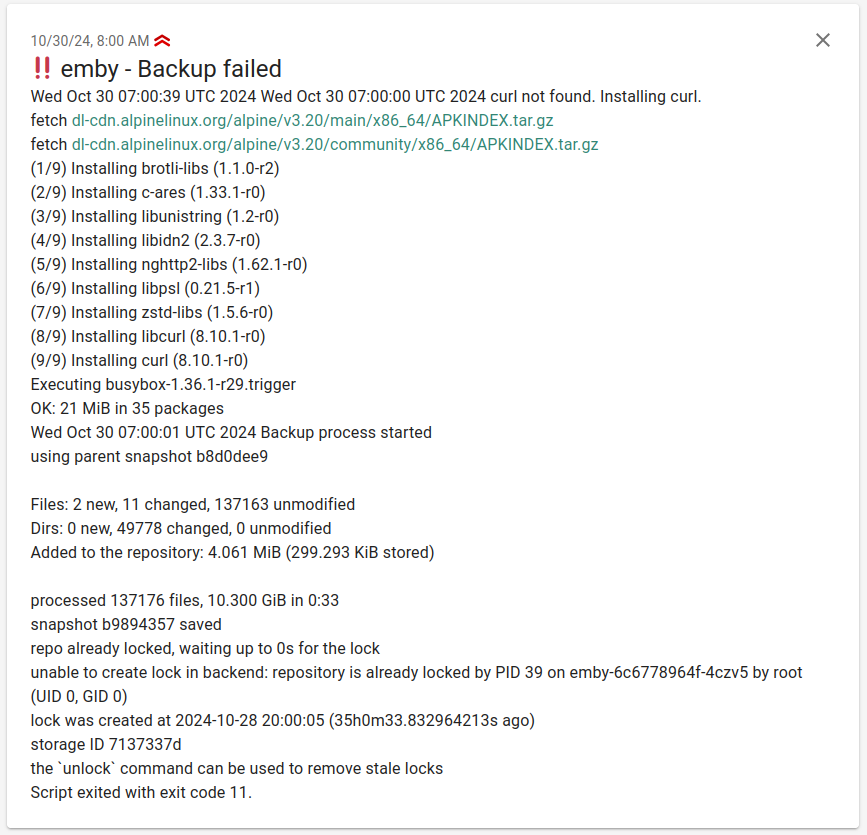
If a backup fails the script sends a ntfy notification. ntfy is a simple notification service that can be self-hosted.
Pushgateway integration#
The script pushes metrics to a Prometheus Pushgateway after each run. This enables tracking backup duration, start time, and status per target.
Configuration#
Set in the per-target backup Secret:
PUSHGATEWAY_ENABLED:"true"to enablePUSHGATEWAY_URL: full URL of the Pushgateway service
Metrics#
| Metric | Description |
|---|---|
backup_duration_seconds | Duration of the backup run, in seconds |
backup_start_timestamp | Unix timestamp at which the run started |
backup_status{status="success"\|"failure"} | Restic exit code (0 on success, non-zero on failure) |
The pushgateway group is keyed by job=backup, instance=<RESTIC_HOSTNAME>, so each new push for a given target replaces the previous metrics — a successful run overwrites a stale failure metric automatically.
A Grafana dashboard built on these metrics lives in apps/monitoring/ks8.grafana-dashboards.backup-script.yaml.
Alerts#
Three PrometheusRule alerts ship in apps/backup-script/k8s.backup-alerts.yaml:
| Alert | Severity | Trigger |
|---|---|---|
BackupOverdue | warning | time() - backup_start_timestamp > 7200 for 10m on any non-retention instance — at least two consecutive hourly slots missed |
BackupRestoreTestFailed | critical | backup_restore_status > 0 for 1h — at least one tag's weekly full-fleet restore could not be verified |
BackupRestoreTestStale | warning | no backup-restore-test push in 9 days — CronJob suspended or failing |
BackupMirrorFailed | warning | backup_mirror_status > 0 for 1h — daily Wasabi mirror returned non-zero |
BackupMirrorStale | warning | no backup-mirror-wasabi push in 2 days — off-site copy is freezing |
BackupFailed | critical | backup_status{status="failure"} == 1 for 5m — last run reported failure |
BackupNeverRun | warning | one of mariadb, emby, nextpvr, downloader, paperless, grafana, restic-retentionpolicies has no backup_start_timestamp series for 24h |
restic configuration example#
RESTIC_RETENTION_POLICIES_ENABLED: "false" is set on every per-target Secret; all forget + prune happens in the centralized restic-retentionpolicies CronJob.
📝 Environment variables#
The shared backup.sh reads the following variables. The KEEP_* variables are inert when RESTIC_RETENTION_POLICIES_ENABLED=false (which is the cluster default) — retention is centralized.
Environment Variable | Default | Description |
|---|---|---|
RESTIC_SOURCE | Unset | Source directory (or space-separated directories) to back up |
RESTIC_REPOSITORY | Unset | Destination repository for the backup |
RESTIC_PASSWORD | Unset | Password for encrypting the backup |
RESTIC_HOSTNAME | $(hostname \| cut -d '-' -f1) | Optional. Hostname recorded on each snapshot. Pin explicitly when the pod name doesn't start with the target name (especially for hostNetwork pods or renamed CronJobs). |
RESTIC_ADDITIONAL_BACKUP_PARAMETERS | Unset | Optional. Extra args passed to restic backup (typically --tag <target> and any --exclude patterns). |
RESTIC_RETENTION_POLICIES_ENABLED | true | Optional. Whether the script runs restic forget itself. Set to "false" so the central retention CronJob owns it. |
RESTIC_CACHE_DIR | Unset | Optional. If set, the script also runs restic check after backup. |
AWS_ACCESS_KEY_ID | Unset | S3 credentials |
AWS_SECRET_ACCESS_KEY | Unset | S3 credentials |
KEEP_HOURLY | 24 | Legacy. Number of hourly snapshots to retain (only when RESTIC_RETENTION_POLICIES_ENABLED=true). |
KEEP_DAILY | 7 | Legacy. Number of daily snapshots to retain. |
KEEP_WEEKLY | 4 | Legacy. Number of weekly snapshots to retain. |
KEEP_MONTHLY | 12 | Legacy. Not implemented. |
KEEP_YEARLY | 0 | Legacy. Not implemented. |
KEEP_LAST | 1 | Legacy. Total most-recent snapshots to retain regardless of time. |
NTFY_ENABLED | false | Optional. "true" enables ntfy notifications on failure. |
NTFY_TITLE | ${RESTIC_HOSTNAME} - Backup failed | Optional. Notification title. Can be a string or a shell command. |
NTFY_CREDS | Unset | Optional. Auth credentials including the -u option. |
NTFY_PRIO | 4 | Optional. Notification priority. |
NTFY_TAG | bangbang | Optional. Tags to categorize the notification. |
NTFY_SERVER | ntfy.sh | Optional. ntfy server URL. |
NTFY_TOPIC | backup | Optional. ntfy topic. |
PUSHGATEWAY_ENABLED | false | Optional. "true" enables metric pushes. |
PUSHGATEWAY_URL | Unset | Optional. Pushgateway URL. |
rclone (history)#
At one point rclone was also evaluated for backups, but it has no de-duplication and storage costs would not have been acceptable. The reference script and configuration are kept here for historical context.